Cradle-to-gate product footprints for metal parts

The realest footprint your supply chain can produce, without the burden.

When it comes to calculating your product footprints, most tools leave you with a spend-based guess or a data request your suppliers never finish. COCO works from the documents your suppliers already have and lets them fill any remaining gaps via a tailored fallback system. It then runs the full calculation automatically and returns a cradle-to-gate footprint. Light on your suppliers, hands-off for your team. Focused on stamped and formed metal parts.

The problem

Getting supplier data and running the calculation is the hard part.

The number is simple in theory. Getting real data out of your suppliers, many of them small shops with no sustainability staff, and then running the calculation is what takes the time. Most of it goes into chasing suppliers and re-keying what they send, and it starts again each time a new customer asks.

What COCO does

From supplier documents to a customer-ready footprint file.

Supplier document step

Connect

Send each supplier one clear request for the documents they already have: invoices, BOMs, material certs. Plain language, their own language, no portal training.

Audit panel showing full calculation

Calculate

COCO runs the full cradle-to-gate calculation (A1 to A3): material inputs, inbound transport, factory energy, allocated to the part. Where a figure is still missing after the tailored fallback, COCO uses an estimate, clearly labelled as one.
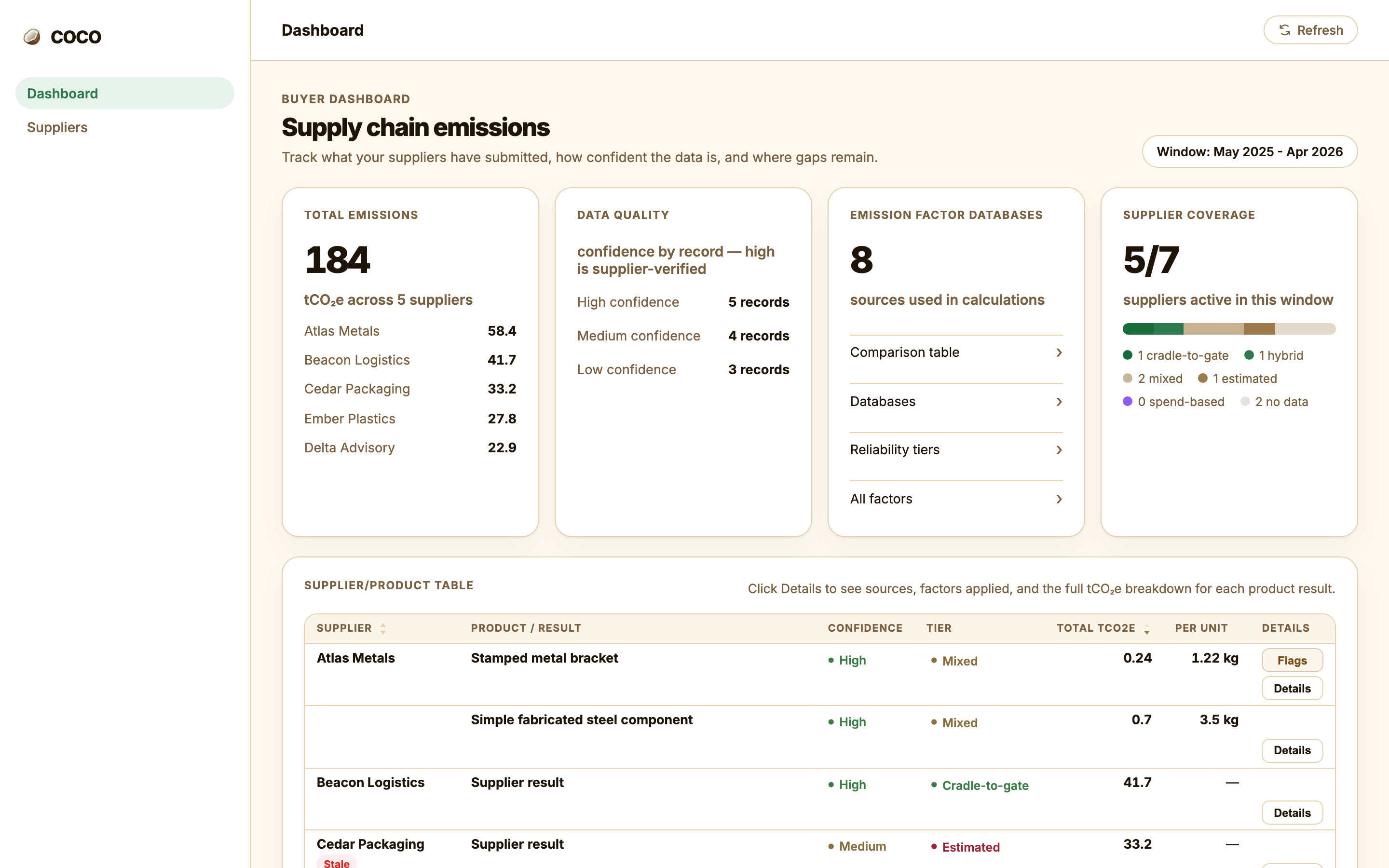
Buyer dashboard with emissions overview

Report

A cradle-to-gate footprint file, aligned with the PACT and GHG Protocol methods, in the format your customer's system expects (SiGREEN, SAP SDX, Catena-X). Every number opens into a full audit panel showing how it was calculated.

The supplier experience

Suppliers upload documents. COCO does the rest.

No questionnaires. No sustainability knowledge needed. Suppliers open a personalised link in their own language, upload the documents they already have: invoices, BOMs, material certs, energy bills, and confirm what was extracted. Most finish in under ten minutes.

  • No accounts to create, no portal onboarding
  • Accepted in any language
  • PDF, Excel, CSV, or Word: whatever they have
  • Estimates accepted where exact figures aren't available
A1-A3
the cradle-to-gate boundary COCO covers, the same boundary Catena-X and PACT use.
2025
BMW made Catena-X registration part of procurement. VW, Mercedes-Benz and Ford are following.
v3
the current PACT methodology. COCO's calculation is aligned with it, not certified against it.

How it works

From supplier request to customer-ready file.

01
List the parts and suppliers
Start from the parts your customer asked about and the suppliers behind them. A spreadsheet is enough to begin.
02
Collect the documents
Suppliers open a personalised link, upload the documents they already have (invoices, BOMs, material certs, energy bills), and confirm what was extracted. For anything the documents do not cover, a tailored fallback walks them through it: a few targeted questions first, and a clearly labelled estimate only for what is still missing after that.
03
Hand it to your customer
Export a cradle-to-gate footprint in the format your customer's system expects, with a full audit panel behind every figure showing how it was calculated.

Full transparency

Every number opens up to show how it was built.

Click any product on the dashboard and COCO shows the full calculation: data extracted from the supplier's documents, the named emission factor applied to each input, and the result: materials, transport, and allocated factory energy, line by line, down to the total.

Automated

COCO does the maths

Normalises units, applies emission factors, and allocates factory energy down to your part. No spreadsheets, no factor lookups on your side.

Private

Source-linked, not stored

Every value records the supplier document it was taken from and the named emission factor applied, with source and database cited per line. The uploads themselves are deleted once the supplier confirms, so their documents never sit on our servers.

Confidence

A confidence level on every input

High means AI-extracted from a document. Medium means supplier-entered. Low means an estimate. You can see exactly how solid each number is.

Tiers

A data tier on every product

Each result is rated LCA-backed, confirmed, mixed, or estimated, so you can distinguish strong primary data from a screening estimate at a glance.

Always a number

Never a blank cell

Every input resolves to primary, manual, or estimated data. A part is never missing a number. It just carries the confidence that matches how it was obtained.

Confirmed

Signed off by the supplier

Before a figure counts, the supplier confirms it. That attestation is what turns extracted data into a number you can put in a report and stand behind.

Suppliers respond because the ask is one specific document, in plain language, in their own language.
COCOFounder-led, working with early design partners

CBAM for EU importers

Declare CBAM on real supplier data, not EU defaults.

Under CBAM, you pay for the emissions in the steel, aluminium, cement, fertilisers and hydrogen you import. Only your suppliers know the real numbers. Without them, you declare EU default values: standard estimates per product and country, with a mark-up that rises every year. COCO connects to your import data, shows what's missing for every shipment, and asks each supplier for exactly that, in their own language. The same supplier network, a second regulation.

01 · Connect

Starts from the data you have

COCO connects to your ERP and customs data, or starts from the import export you already have.

02 · Scope

Finds what's in scope

COCO picks out the imports that fall under CBAM, with the CN code (the EU customs code for the product), country of origin, tonnes, supplier and importing entity.

03 · Gaps

Shows the gaps per shipment

Every import line gets its own CBAM record. It shows what's known, what's missing, and the emissions you'd declare at EU default values, today and once the mark-up peaks.

04 · Ask

Asks for only what's missing

Each supplier gets one specific request in their own language, with no account to create. They can answer, upload documents they already have, or send the EU CBAM template they may already fill in for other customers.

05 · Fill

Fills the gaps automatically

Supplier answers and documents flow straight back into each record. Every number carries a data-quality level: default, self-reported, evidence on file, or verified.

06 · Declare

Declaration-ready

Each record ends up backed by actual supplier data, ready for your CBAM declaration and your verifier.

CBAM key dates

2026
The definitive period started on 1 January. Imports from then on carry a CBAM cost.
10→30%
The mark-up on default values for steel, aluminium, cement and hydrogen. It is 10% in 2026, 20% in 2027 and 30% from 2028.
Feb 2027
CBAM certificates go on sale.
Sep 2027
The first annual declaration, covering 2026 imports, is due on 30 September.

Open to pilots

Be one of our first CBAM pilots.

We're looking for a small number of EU importers to shape COCO for CBAM before the first declaration is due.

No sales scripts. One conversation about your imports. sales@compliancecompanion.nl
We use your details only to reply to this request. See our Privacy Policy.

Get started

See COCO in action.

Book a 30-minute call. We will walk through your parts, the suppliers behind them, and what a customer-ready footprint file looks like for your case.

No sales scripts. One conversation about your supply chain. sales@compliancecompanion.nl
We use your details only to reply to this request. See our Privacy Policy.